The Anyport Team
Most pull requests do not need a preview
A preview for every pull request is the default everybody ships, and most of those previews are never opened. Creating them on request turns out to be mostly a question of what the pull request comment should offer, and who is allowed to tick it.
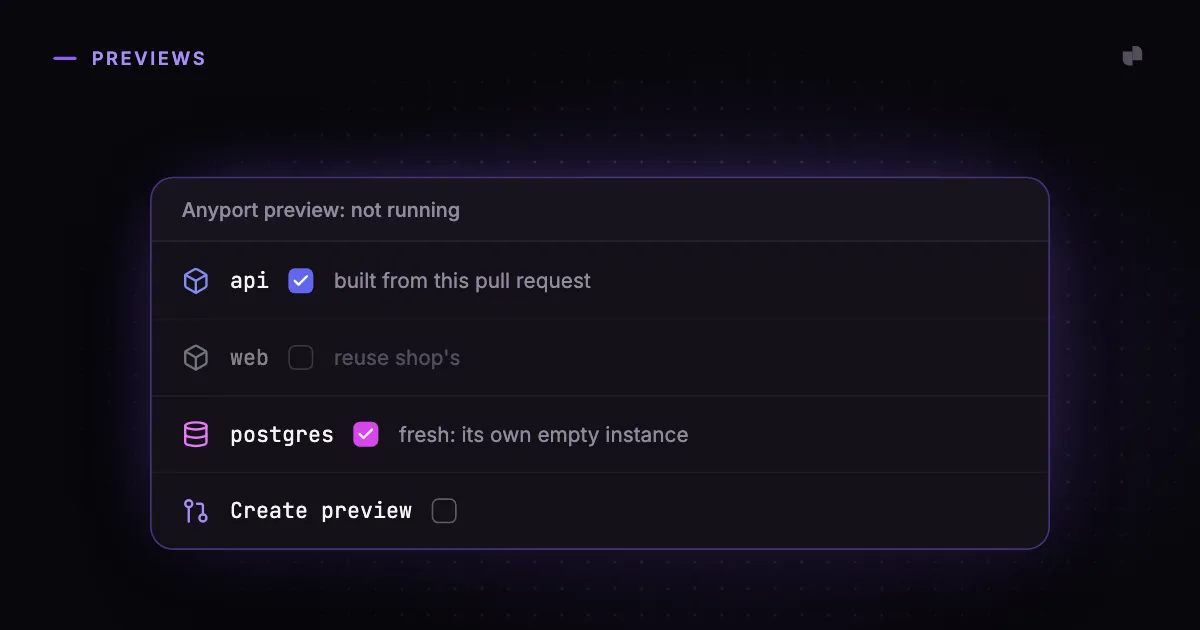
Preview environments are usually sold as automatic: open a pull request and a copy of the project appears on its own URL. For the pull request that changes the checkout page, that is exactly right. For the other nine that week, it is a copy of the whole project that nobody opens.
Look at what a busy repository's pull requests actually are. A dependency bump from a bot. A typo in an error message. A refactor the tests already cover. A change to the CI configuration. Each of them gets apps, a database, a build of the branch and a URL, and each of them holds that until the pull request closes or the preview expires.
What an unopened preview costs
On a platform that bills by the hour, an unopened preview is a line on an invoice. On a cluster you own it is something less visible and more annoying: CPU and memory reserved by apps nobody is calling, a database's volume per open pull request, and a build of every branch competing with the builds somebody is actually waiting for. A preview of a three-app project with Postgres reserves as much as the project's production does, because a copy carries the same resource requests as the thing it copied.
Caps help. A limit on how many previews can run at once stops a busy week from filling the cluster. But a cap decides which pull requests get a preview by arrival order, so the one a reviewer needed is refused because five dependency bumps got there first.
The better default is to create nothing until somebody asks. Most pull requests are reviewed by reading the diff, and the ones that need a running copy are usually obvious to the person reviewing them.
Where to ask
There are four reasonable places to put the button. A label on the pull request works, and needs triage permission, and says nothing about what the preview will contain. A slash command in a comment means parsing free text, replying to confirm, and deciding what /preview api means when there is also an api-worker. A button in the platform's console is unambiguous, and is three tabs away from the review.
The fourth is the comment the platform already leaves on the pull request. GitHub renders a task list in a comment as checkboxes, and ticking one edits the comment, which arrives as a webhook. So the comment can describe the preview it would create, as boxes, and the reviewer can change it and create it without leaving the page they are reviewing on.
What the comment should offer
Once the comment is a control, the useful question is no longer only whether to create a preview, but what goes in it.
Each app is copied or reused. The app under review gets its own copy, built from the branch. The others can be reused: the base project's running instance, reached by the same name, so http://web:3000 still answers and the preview does not pay for a frontend the pull request did not touch.
Each database is fresh, copied, or shared. These are labelled by consequence rather than by name, because they are the words that decide whether somebody points a pull request at real data: "its own empty instance", "restored from the latest backup", "anything the preview writes lands in the base project's data". A choice that is not possible is not offered. A copy needs backups to copy from, and sharing needs the preview on the same cluster, and a service with only one possible answer is stated as text, because a box that changes nothing is worse than no box.
The cost is on screen. The last line of the offer says what the preview would reserve, recomputed from the boxes as they stand. A reviewer deciding whether to add the second app sees that it doubles the memory before ticking it, rather than afterwards on a dashboard.
Ticking is not creating
Three rules keep a comment full of checkboxes from behaving like a minefield.
Choosing does nothing on its own. Ticking three apps one after another changes the offer three times and creates nothing; only the box labelled Create preview creates. Otherwise every click would be a build.
Only people who can write to the repository can act. Anybody else's tick is undone, and nothing is posted in reply, because a reply to a stranger's tick is a way for strangers to make the bot talk. Pull requests opened by bots get no comment at all until somebody asks for their preview from the console.
A running preview's contents do not change from the comment. Switching a live preview's database from fresh to shared halfway through a review would mean migrating its data, or abandoning it, and both are surprising. Destroying it and creating it again with a different choice is one more click and never surprising.
How this works in Anyport
In a project's Settings → Preview environments, When to create a preview is When somebody asks by default. Each pull request then gets a comment headed Anyport preview: not running, listing the project's apps and services as boxes, starting from the project's own defaults, with the footprint line underneath. Tick Create preview and the preview is built with exactly that choice, after which the same comment lists its URLs and offers Destroy preview. The project's Previews tab lists the open pull requests without a preview, each with a Create preview button that offers the same choices.
For every pull request is still there, and projects that had previews before the setting existed stay on it. The comment controls need the Anyport GitHub App subscribed to issue comment events; without that, previews can still be created from the Previews tab. The documentation has the details, including what each service option does to the data.